
Multidesk 64
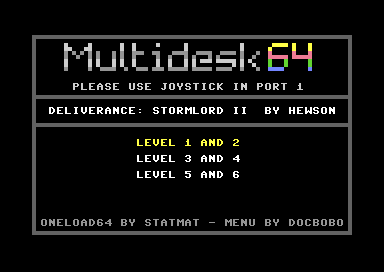
tl;dr: This tool can make a 5-in-1 MagicDesk cart with a simple selection menu. Requires no coding and only works with SOME MagicDesk carts.
Update, Update!
OK, you can read all the stuff down there if you want to know how this works. But here is a Python script that can do ALL the hard work for you.
Requirements:
- Python interpreter on your machine
- ACME assembler in your path (acme.exe)
- VICE cartconv.exe in your path
- The multidesk-build.py script
Too lazy to get this all? Get a full working package here.
The script requires cartridges as .crt files in MagicDesk format from one of this three sources:
- OneLoad64 (tested with V5 and V6 cartridges)
- Created with CRT_Linker V22 (no other versions!) by Pugsy
- Created with VICE Snapshot to PRG Converter V 2.0 by Tommyo
It is out of scope to explain how to use these tools, they are well documented. Make sure you create MagicDesk Cartridges, not Easy Flash, when using Tommyos tool.
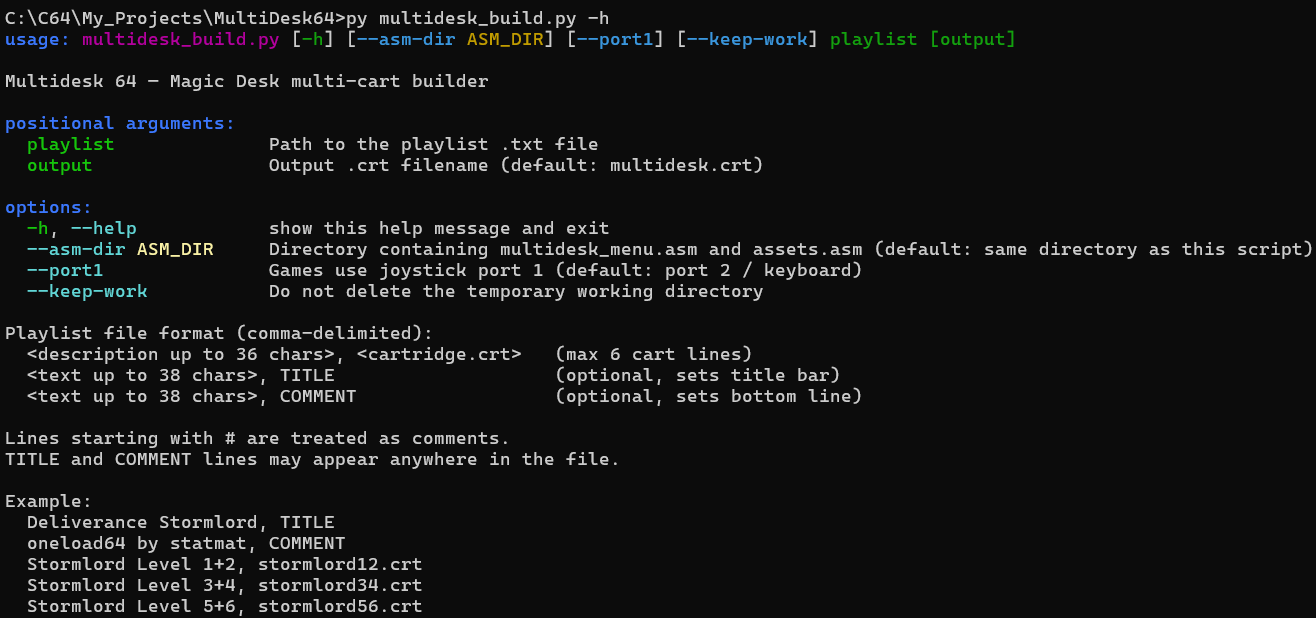
You just need to supply a .txt file with the Menu Titles, Filenames and Titles/Comments to automagically build a .crt ready for VICE. The tool documents itself by typing
python multidesk_build.py -help
Introduction
Multidesk 64 is a small brute force hack that was developed for the OneLoad64 project, but is not limited to that. The idea for this is to combine several MagicDesk cartridges into one Multi-Cart. This is, of course, impossible.
The MagicDesk format is a simple and effective bank-switching cartridge. It shows up in the memory space of $8000 to $9FFF and a simple write into $DE00 switches into the specified bank. There is no protection against switching into non-existent banks and there is no way to find out which bank is currently active, as reads from $DE00 will make uncontrollable bank switches. It is a bare-bones as it gets. Oh, and writing a value higher than $7F will switch the cart off. This gives you 128 banks of 8K each. (There is an extended format with even more banks, but that has a different bank switch logic).
Because of its simplicity, the format has been adapted by several projects to create fast starting games for emulators. The three main projects are:
- OneLoad64 with literally thousands of games in MagicDesk format
- MagicDesk CRT Linker which allows to convert VICE freezes into cartridges
- T64 to CRT, my own project to convert tape-based software into cartridges
Most C64 games just load once and then never need to access a disk or tape. Many C64 games require constant loading of parts from disc or tape. And then there are some C64 games that consist of several parts which the user must load themselves. Sometimes the two sides of a tape have different versions of a game (IK+), sometimes you need to play through Part 1, receive a password, manually load Part 2 and then type in that password to continue. Those games so far were also split into several cartridges in the OneLoad64 collection and I wanted to change that.
MultiDesk 64 is a very simple boot menu that uses just the first bank of a MagicDesk cart (Bank #0). It shows a menu that can switch to up to five (well, up to six) other MagicDesk carts.
The trick is that these other carts have to be patched. They just need to know that they start in a different bank than #0. This requires either reassembling or patching the carts. For the first release of this project, there are methods to use carts from the OneLoad64 project and those created with CRT_Linker. More will follow early 2026 (including my T64 project and the MagicDesk carts created by The Joker).
Update: The Joker modified the tape loader code in a way that it is unpatchable with a simple byte replacement. Basically the full 512 byte loader must be replaced. I have released preliminary and untested code to Forum64 and will pick up the work early 2026.
Basically this is all that happens:
- Show menu, wait for input
- Switch Bank to the Start Bank of the cartridge the user selected
- Call Reset and now a DIFFERENT cart boots up
The menu
The menu code is split in two parts for the ACME assembler. Everything you need to touch for your own project is in assets.asm, but you need to compile multidesk_menu.asm which then includes the data file. Most options are self explanatory, but here is the rundown:
- You need to set whether the games you put on the Multicart require Joystick Port #1 or #2/keyboard. This avoids using a different port for the menu and the game itself. Sorry, no mix and match. If you need keyboard, use #2.
- Standard timeout for automatic selection is 500 frames, or 10 PAL seconds. Then the currently selected item will be started, if no input is made that is the first one.
- Colors as standard C64 colors if you do not like the scheme I picked
TxtGameName: max 38 characters for the name of the complilation, displays in line #6TxtComment: max 38 characters for the bottom lineITEM_COUNT: The number of menu items to use. Max is 5, (can be 6 when you leaveTxtCommentempty (e.g. it has at least one whitespace but no letters))MenuTextBase: Zero delimited, small letters only (PETSCII), 38 chars max. It does not hurt to have MORE entries here, but it will hurt badly if you have less thenITEM_COUNT.MenuBanks: The bank numbers for the menu lines. So, if you select the first item, the bank will be #01 (most likely always as it follows the menu itself in #0). The second item needs to be the bank the second entry will be in the final cartridge, more to that later.TxtInstructions: Can be changed if you need something else then Joy #1 / Joy #2 textmap_dataandmap_colour_data: feel free to include any other PETSCII screen here. Standard format as output by most editors if you want assembler code.
Patching OneLoad64 games
If you want to combine several games from OneLoad64 into one cart, you need the cartconv.exe from VICE as well as a Python interpreter and the provided "oneload.py" script. The first menu item would live in bank 1, to patch it you simply do this:
cartconv -i CARTNAME.crt -o CARTNAME.bin
python oneload.py CARTNAME 1
There will be several checks and then you have a patched CARTNAME.bin. This will most likely be 64K, 80K or 88K long. This is either 8, 10 or 11 banks. So, as we have started in bank 1, this goes to 9, 11 or 12. Meaning, the next cart starts at 10, 12 or 13.
For the game Deliverance: Stormlord II we get to the following numbers:
| Level 1 & 2 bin | 88 K | 11 banks long | Bank 1 | ends Bank 11 |
| Level 3 & 4 bin | 88 K | 11 banks long | Bank 12 | end Bank 22 |
| Level 5 & 6 bin | 88 K | 11 banks long | Bank 23 | ends bank 34 |
So the starting bank numbers for assets.asm are 1, 12 and 23.
And the bin for Level 3 & 4 needs to be patched with 12 (decimal, $0C in hex):
python oneload.py LEVEL34.bin 12
and equivalent for 5 & 6 with 23 (decimal, $17 in hex).
After compiling the menu with ACME, you will receive a file boot.bin. Use a binary copy command to connect all files together. This can be used for EPROM burning. To use this cartridge in VICE we need to cartconv again.
copy / b boot.bin + level12.bin + level34.bin + level56.bin deliverance.bin
cartconv -i deliverance.bin - o deliverance.crt -t md -p
Do not forget the -p parameter, as the cartridge will be "odd sized".
Combining CRT_Linker Games
If you are using CRT_Linker from Pugsy to create your own carts, you can create them directly for different banks. The output from this tool is preformatted so you do not need the cartconv steps and can do straight copies. Here's how to proceed:
Get V17 (or later) of CRT_Linker: New Release: Magic Desk CRT Linker (make your own CRTs) - Page 11 - Commodore 64 - Lemon64 - Commodore 64
In multidesk_menu.asm set the parameter VICEHEADERto 1. (By pure chance this is in line 64 :-). This will build a stub boot.crt file rather then a .bin.
For the first game in the menu, call CRT_Linker with the -bank01 parameter:
crt_linker 1.freeze.vsf 1.crt -bank01
As the files created can have different lengths, the linker will tell you in which bank the next game should start.
Saving headerless CRT with banks numbered from 1 to 8
Create next game crt with -bank09
So here we go with
crt_linker 2.freeze.vsf 2.crt -bank09
Please write down the bank numbers, these are the numbers you need to set in assets.asm
You can now simply binary copy and combine without using cartconv:
copy /b boot.crt + 1.crt + 2.crt compilation.crt
Ready!